See who visits the garden while you sleep.
Connect the camera you already have: any IP camera that can send a snapshot by FTP, SFTP or HTTP, or an Ecowitt HP10. Every new photo is checked for animals, people and vehicles, each animal gets a species name where the model is sure, and the sightings sit on your dashboard next to the readings.
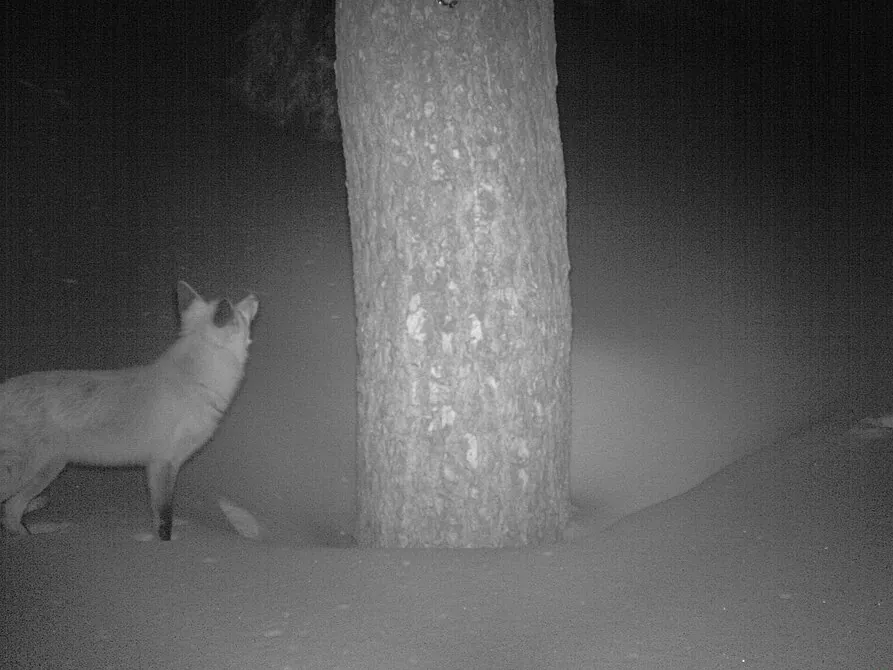 Garden camera · 01:43Red fox 95%
Photo: Lassen Volcanic National Park, public domain. The box and the name are what SpeciesNet returned for it.
From a photo to a name, in four steps
Nothing is sent to an outside AI service. The two open models run on the WindRose server, on every photo your camera takes.
Your camera uploads a snapshot to WindRose, every few minutes or on motion. For an Ecowitt HP10, WindRose fetches the newest photo from Ecowitt's cloud every 5 minutes. Either way a private copy is kept.
MegaDetector looks over the whole frame and draws a box around every animal, person or vehicle, with how sure it is. Empty frames (grass in the wind, rain, a passing shadow) end here.
Each animal box is cropped and passed to SpeciesNet, which weighs nearly 2,500 categories of mammals, birds and reptiles and gives its best name with a score.
The name is checked against your station's country (and US state), so a moose is not called an elk in Alaska. When the model is not sure, it says a broader name, such as a family or simply "animal", instead of guessing.
Works with the camera you already have
Most IP cameras can upload a snapshot to a server on a timer or on motion, the same way weather webcams have fed Wunderground and Windy for years. These have it built in, with no add-on and no extra subscription.
PoE and plug-in models such as the RLC-810A and RLC-811A upload pictures by FTP. Battery models usually do not: check for FTP in the specifications.
Network cameras such as the ColorVu DS-2CD2387G2-LU take a timed or motion snapshot and upload it by FTP.
WizSense cameras such as the IPC-HFW2849S-S-IL send scheduled or event snapshots by FTP or SFTP.
4K PoE cameras such as the IP8M-2496E upload a snapshot every few minutes by FTP or SFTP.
Any Axis network camera, such as the M2036-LE, can send images by FTP, SFTP or HTTP from an event rule or a schedule.
No upload to set up: it is linked through the same Ecowitt account as your station. Use "Search for new devices" on the station page.
Three ways in
Add a camera from the station page and pick how it sends. WindRose shows the details to type into the camera's settings. One photo every 2 minutes is kept; extra uploads are simply dropped.
Port 21, passive mode, explicit TLS when the camera offers it. Each camera gets its own user and folder, and can see nothing else.
Port 2222, for cameras that encrypt over SSH. Same user and password as FTP.
POST the picture, raw JPEG or a multipart file, to a private URL with the camera's token. Handy for scripts, a Raspberry Pi or a home automation system.
Sightings on the dashboard.
The camera card shows the newest photo and the animals seen over the last week, each with how many times and when. Open a photo full screen and the boxes show what was found and where.
- A confidence floor per card: hide anything the detector was less sure of
- Show the live photo, the sightings, or both
- Several cameras on one station, each its own card
Built so that a public camera stays polite
Turn on blurring for a camera and every person the detector finds is pixelated past recognition in the copy other people see. Until that copy exists, nobody but you sees the photo.
A camera card is yours alone until you choose to show it on a public board. Recognition and blurring are switched on or off per camera.
Photos are deleted 7 days after they were taken, with what was found in them. Remove a camera and its photos go with it.
The models behind it
WindRose uses two open-source models from the camera-trap research community, the same ones conservation projects use to sort millions of images.
Trained on more than 65 million labelled camera-trap images. On Google's held-out test set it found 99.4% of images with animals, named the species in 83% of cases, and was right 94.5% of those times.
The detector SpeciesNet relies on to find animals, people and vehicles in a frame. Open source, used by wildlife agencies and research groups worldwide.
An animal far from the lens fills only a few pixels. It is still found and counted, but may be named only "animal". Mount the camera close to where animals pass for the best names.
Try it on your own station.
Free for one station, no card needed. Upgrade only if you want more.